
The Flash Team is in the middle of doing a lot of customer visits, getting information and feedback for the next version of Flash (we are currently in New York City). As part of this process we actually watch users for about an hour working on a project in Flash. This has been really interesting, and aside from learning how we can improve Flash, I have been learning a ton about Flash itself (and I thought I knew it pretty well).
Here is the first little gem I wanted to post about. We were watching a user working on a project in Flash, and they had imported about 20 images which all got imported to the same layer on the stage. They then began to manually move each image to its own layer (a very tedious process). Of course, Flash has a “Distribute to Layers” command that does exactly this. Basically, select all of the items / objects on your stage that you want to distribute to their own layers and select Modify > Timeline > Distribute to Layers (SHIFT-COMMAND-D on Mac). This will place each item on its own layer of the timeline.
Check out this really cool Flash Video based Euro 2004 application. It shows videos of each goal in the tournament, as well as a diagram of the players on the field during the goal.
You can view the application here (Click the Open FlashBack link).
Being in the United States, I didn’t get to see much of Euro 2004, so now I can finally get my fix.
Sorry for the lack of delays lately, I have been pretty busy with a couple of projects and haven’t had a chance to post much on my weblog.
So, what has been going on? Well, first and foremost, I have really been focusing on Ellipsis, the upcoming update to Flash MX 2004. I won’t go into much detail on this just yet, but you can find a lot more info on the FlashTeam weblog, and I wouldn’t be surprised to hear some information on it at the FlashForward keynote this week in New York City.
I am posting this here so I don’t loose the link. Here is some info on how to customize the search bar in the FireFox browser to be larger.
http://www.digitalmediaminute.com/article/672
Note that when I tried it, the userChrome.css file was emtpy, but it still worked.
In case you haven’t noticed, the Flash Team has launched a weblog:
http://www.markme.com/flashteam/
Mike Downey made a post with information on why the team started the weblog.
Right now, we are going to be posting information about Ellipsis (an upcoming free update to Flash MX 2004).
We have already posted information about one of the issues addressed in Ellipsis:
#87305 : Compile time degrades over time
The ultimate goal of the weblog is to get more information out, sooner, and provide a way for the Flash Team to communicate directly with the community (and vice - versa).
We have made a ton of new Macromedia XML feeds available in order to make it easier for everyone to keep up with the latest news, technotes, articles and other information from Macromedia.
Here is a list of some of the products covered:
You can find out more information, as well as view all of the feed URLs from:
http://www.macromedia.com/go/rss_info
Well, after I put together my simple Quake Bar app, I figured I would tweak the code a little more, and make an app to watch one of my favorite sites, engadget.com.
So, here is engadgeter (I know, lame name). This is a simple status bar application for OS X that notifies you when new articles have been posted to engadget.com.

Here is a screenshot.
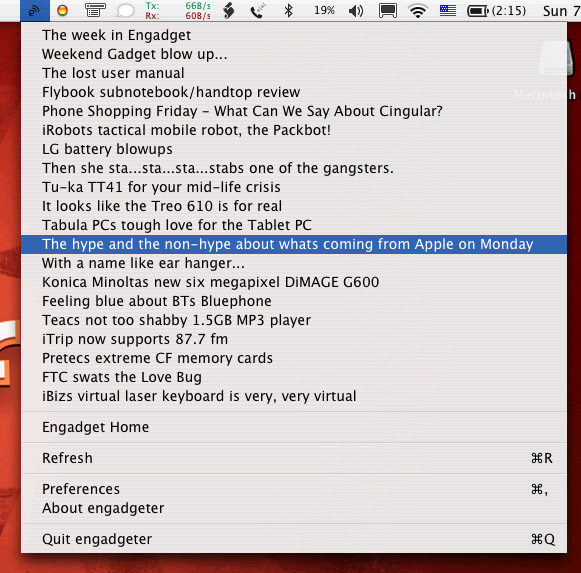
You can download the application from here (USE AT YOUR OWN RISK).
I have been learning Objective-C and Cocoa development lately, mostly so I can create a Mac version of my Flash Resource Manager application.
Anyways, since I live in San Francisco now, I figured that I need to know when earthquakes occur, so I created QuakeBar.
QuakeBar is a simple application for OS X that sits on the status bar, and lists the most recent earthquakes in the world, with a magnitude greater than 2.5 on the richter scale.



