
I finally figured out how to access the internet from my PowerBook connecting through my Motorola v600 and Bluetooth. Below are instructions for getting online with the Motorola v600 and ATTs wireless service.
Tested with the following setup:
Here are the steps:
References:
Just a quick note that my “What is the significance of Ellipsis” article has now been translated to quite a few languages. Here is what I wrote about the article in an earlier post:
While I think Ellipsis as an update to Flash is huge, I think it takes on an even greater significance when you look at it in the context of other things that have been going on at Macromedia and on the Flash team. I wrote an article on just this subject, and if you have the time, I highly recommend reading it. Hopefully it will help give a glimpse into how we are thinking of things, how Ellipsis fits into the context of all of the recent changes, and how it relates to 8Ball (next full version of Flash).
The guys over at pixelconsumption have put together an excellent tutorial on how to add ActionScript support to Xcode on Mac OS X.
This is really sweet, and includes support for:
You can read the entire article here.
Yesterday I released a preview version of the MAC OS X version of TattleTale. Today I am releasing a (slightly rougher) beta version of TattleTale for Windows.
What is TattleTale? TattleTale is a simple application that makes it easy to keep up with the latest news and information from Macromedia. Here is a screenshot of the Windows version:
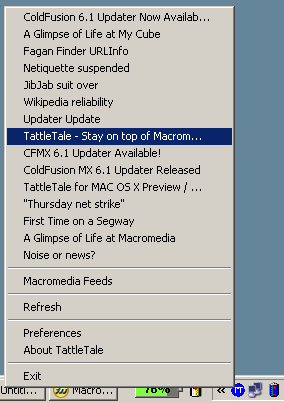
Note, the icons for the Windows version of TattleTale are place holders and not final.
Christian Cantrell and I have been working on a mini project for making it easier to keep up with the latest news and information from Macromedia. The name of the application is called TattleTale, and we are releasing the OS X version for beta / preview today.
What is TattleTale? TattleTale is a simple application that makes it easy to keep up with the latest news and information from Macromedia. Here is a screenshot of the OS X version:
Does anyone (aside from FlashLite authors) still use Flash 4 ActionScript syntax? i.e.?
Set Variable: "f4" = "true"
If (f4 eq "true")
	Stop
Else
	Play
End If

Begin Tell Target ("/")
	Stop
End Tell Target
If so, what version of Flash are you using? Post your info in the comments section.
As pointed out by Chafic over at rewindlife, Sapien has a released a new version of Primalscript that has support for the latest Flash update (Ellipsis).
You can find more information, as well as download the update from here.
You can find more information on Ellipsis here.
Sorry for the lack of update recently. I was in Japan for a week with the Flash team meeting with customers about 8ball. After that, I took all of last week off to catch up on some reading, video game playing, and hanging around with my daughter.
If you sent me and email during the past week, I may not have been able to respond yet. Don’t worry though, I am starting to catch up on emails. Also, one of our filter servers went down, so if you sent me a mail, you may have received a message that it bounced. Don’t worry, I still got your email, as it didn’t bounce from the main mail server.
I just notice that a new version (1.01) of Smultron has been released. Smultron is an excellent open source Cocoa based text editor for OS X, that is fast, has basic support for ActionScript color coding, and has a single window document model. You can find a list of changes here.
You can find more information about, as well as download Smultron from here.
Btw, I have my own version running locally which adds support for compiling (Publish and Test Movie) FLAs, which I will try to release in the next couple of days.
Christian Cantrell and I (mostly Christian) have updated the Macromedia XML News Aggreator (MXNA) with support for syncing with Apple iPods. The project, code-named “Take-Away” allows you to read and listen to the latest Macromedia community news (by category) on your iPod.
You can find more information on Take-Away (including how to sync it with your iPod) here.



