
Ted Patrick has a good write-up of the new ActionScript 3 flash.util.Proxy class. What is the Proxy class? From the API docs:
The Proxy class lets you override the default behavior of ActionScript operations (such as retrieving and modifying properties) on an object.
…
The Proxy class is a replacement for the Object.__resolve and Object.addProperty features of ActionScript 2.0, which are no longer available in ActionScript 3.0. The Object.addProperty() feature allowed you to dynamically create get and set methods in ActionScript 2.0. Although ActionScript 3.0 provides get and set methods at compile time, you cannot dynamically assign one to an object unless you use the Proxy class.
Ely Greenfield has put together a cool Flex 2 FishEye menu component (complete with source).
Ely discusses how he is try to show the type of expressive content that can be built with Flex:
One important goal with this component, as with a bunch of things I’ve been working on lately, is to help the community see how you can merge the best of what flex gives you (productivity, development process, consistent component model) with the best of what people have been doing in flash for years (rich, highly interactive, fluid, etc). The SDK’s GUI components provide a lot of value, but they’re really just the tip of the iceberg of what’s possible with Flex. Hopefully these kinds of demos whet your appetite.
Probably one of my favorite features of Firefox is its very intuitive incremental search. In fact, I find it so natural that I often find myself trying to use it in other programs. Luckily, the other program I spend most of my time in (Flex Builder 2) also supports it.
Just type CTRL-j and start typing your search term. The focus in the editor will move to the match as you type. Type CTRL-j to move to the next match, and ESC to exit. The search status is also displayed on the status bar.
If you need to get a quick view into an Object or class instance, you can use the mx.utils.ObjectUtil.toString() API included in the Flex 2 Framework.
package
{
	import flash.display.Sprite;

	public class ViewType extends Sprite
	{
		import mx.utils.ObjectUtil;
		import flash.util.trace;

		public function ViewType()
		{

			var o:Object = new Object();
				o.foo = "bar";
				o.arr = [{name:"Homer"}, {name:"Bart"}];

			trace(ObjectUtil.toString(o));
		}
	}
}
This will output the object in a more human readable format like so:
(Object)#0
  arr = (Array)#1
    [0] (Object)#2
      name = "Homer"
    [1] (Object)#3
      name = "Bart"
  foo = "bar"
You can view the docs for the api here.
I just uploaded this weeks podcast.
Download Podcast for April 12, 2006This weeks podcast discusses:
Here are the links mentioned in the podcast:
I have noticed over the past couple of weeks that the volume of posts to the FlexCoder’s list seemed to be increasing. So, in order to confirm this, I put together [a quick chart that plots the last two years of post volume to FlexCoders broken down by month][2].
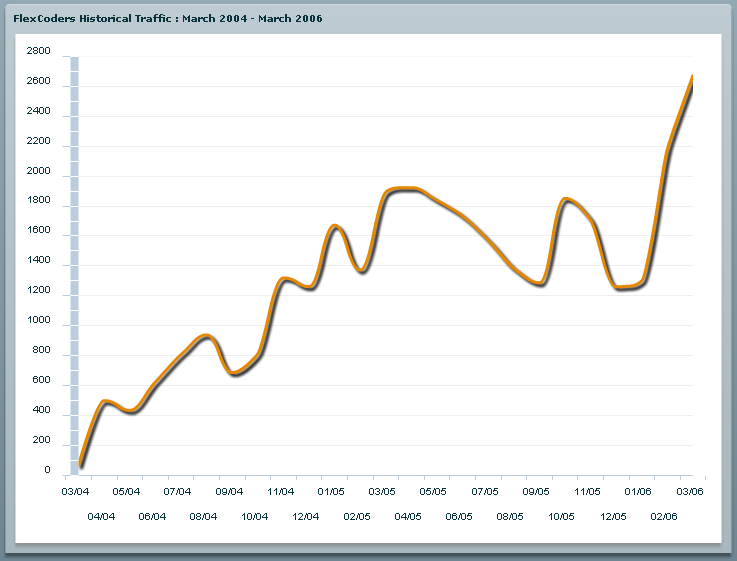
As you can [see][2], it has definitely been trending up, with a pretty sharp rise since the beginning of the year.
Werner Sharp (one of the Flash Player engineers responsible for E4X in the player) posted an example on the FlexCoders list showing how to dynamically iterate over XML attributes and their values using E4X in ActionScript 3. I wanted to post it here as it is useful to know, and to store for future reference.
This code below actually shows two ways to do this. The first using a for each in loop, and the second using a for loop.
Sho Kuwamoto has posted a new Flex 2 component that he has built that creates a sliding panel / drawer.
The component is useful by itself, but it also shows one way to create a custom component in Flex 2.
You can find more information, as well as view the component and download the source from here.
Je Berkovitz has put together a connect 4 game using Flex 2 and ActionScript 3. This version allows you to play against the computer, and I have to say, the computer is pretty tough (I haven’t been able to beat it yet).
You can find more information, as well as play the game here.
Post in the comments if you are actually able to win a game.
Ali Mills and Luke Bayes have just started a blog and have posted a comprehensive tutorial on how to create ActionScript 3 projects in Flex Builder 2. This is a great tutorial to get started with ActionScript 3 and Flex Builder.
You can read the entire tutorial here.
You can download the Flex Builder 2 beta from labs.



