
The title pretty much sums it up. What would you like changed in the next version of the EULA for all Studio tools?
You can view the EULA here.
Apple is rolling out its next generation OS next week, code named “Tiger”, and it is looking pretty sweet. However, as with any update this significant, there are bound to be some issues. We have put up a page listing all know issues with Macromedia products running on Tiger. Make sure to check this out before you upgrade in order to ensure that your day to day work flow is not affected.
I was working on some new mini chart apps over the weekend for the MXNA reports section, and had a DataGrid that contained dates. I wanted to allow the user to sort the datagrid by the DateField, but by default the DataGrid sorts dates with a string compare (calling toString on the Date instance).
I tried to set up a custom sort function for the DataGridColumn instance that contained the dates, but because I was using a custom label format function for the column, Flex passed the labels to me, and not the data items (which would allow me to get access to the Date instance). Because of this, I couldn’t sort on the date.
Well, as many of you noticed yesterday, the markme.com domain expired (doh!). Apparently Network Solutions had been sending me renewal notices for the past couple of weeks, but they were being sent to an old email address. Anyways, the domain has been renewed and should be working for everyone again. I am sorry for any hassle that it caused.
Since I am posting about markme.com, I figured I would give you an update on our plans for the domain and server. As you have probably noticed, the new MXNA 2 beta is running on a new machine and domain : weblogs.macromedia.com. The new domain and machine are managed and hosted by Macromedia, so we won’t have to worry about domains expiring in the future! We are in the process of transitioning all of the the content on markme.com over to weblogs.macromedia.com.
As Christian just posted, we have added a new section to the MXNA 2 beta. The new section is titled Reports, and lists all of the reports and analytics available at MXNA.
The report / charting mini-apps are built using the Flex Framework, and are then compiled into SWF. The ColdFusion page they are contained within dynamically passes info into the chart to configure default parameters. The charts and graphs are created using the components built into the Flex framework, and get their data from the MXNA web service API. When the user clicks on a chart item, Flash calls out to the containing HTML page, and a Javascript function uses some AJAX to load context sensitive posts into the HTML page. All without having to refresh the page.
Well, as you probably have probably heard by now, Macromedia and Adobe announced this morning that our companies are combining. If you are like me, then I am sure there are a ton of questions going through your head. We have put up a mini site with more information, but I wanted to make a quick post to put some more context around what is happening.
First, Macromedia and Adobe have announced that we are combining into a single company. However, and this is a very important point, this has not occurred yet, and will not occur until approved by stockholders and government regulators. This is an important point, because during this period, there will be some legal constraints on what I (and other Macromedia employees) can and can’t speak about in public (see the end of the post for an example). So, please keep this in mind if you ask a question and are referred to the FAQ or web site.
I came across some of the Flash related entries at wikipedia this weekend, and, as I know a bit about Flash, I began to correct and add some info. However, as I thought about it, I realized that some people might not like the fact that I, a Macromedia employee, was editing and contributing to Macromedia related entries. I was concerned that people would be concerned that since I was from macromedia that any info I added would display a bias.
Riffing off of the Flash View Source library I posted yesterday, Danny Dura has put together a custom Flex tag that makes it easy to add View Source and View License menu items to Flex applications.
You can view an example, as well as download the code from here.
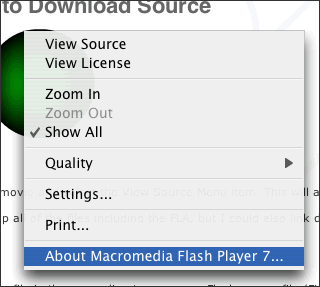
I have updated the Flash View Source library to also allow you to add a context menu item that allows you to specify a link to the type of license that the content is distributed under.
Here is a screenshot of the Flash context menu using the library:
You can find more information, and well as download the code from here.



