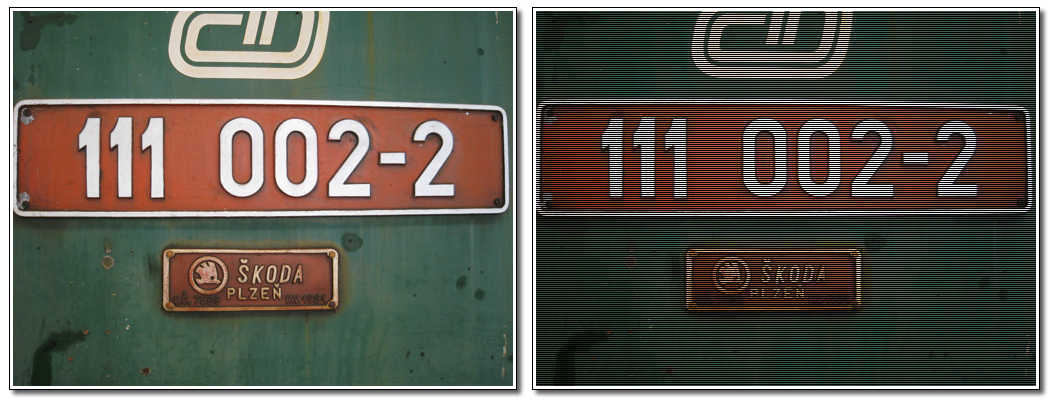
<?xml version="1.0" encoding="UTF-8"?><rss version="2.0"
	xmlns:content="http://purl.org/rss/1.0/modules/content/"
	xmlns:dc="http://purl.org/dc/elements/1.1/"
	xmlns:atom="http://www.w3.org/2005/Atom"
	xmlns:sy="http://purl.org/rss/1.0/modules/syndication/"
		>
<channel>
	<title>Comments on: Pixel Bender TV Scanline Filter</title>
	<atom:link href="http://www.mikechambers.com/blog/2008/09/17/pixel-bender-tv-scanline-filter/feed/" rel="self" type="application/rss+xml" />
	<link>http://www.mikechambers.com/blog/2008/09/17/pixel-bender-tv-scanline-filter/</link>
	<description>code = joy</description>
	<lastBuildDate>Thu, 11 Mar 2010 21:22:56 +0000</lastBuildDate>
	<generator>http://wordpress.org/?v=2.9.2</generator>
	<sy:updatePeriod>hourly</sy:updatePeriod>
	<sy:updateFrequency>1</sy:updateFrequency>
		<item>
		<title>By: Pixel Bender + Video = Killer Runtime Effects &#124; Brooks Andrus</title>
		<link>http://www.mikechambers.com/blog/2008/09/17/pixel-bender-tv-scanline-filter/comment-page-1/#comment-18388</link>
		<dc:creator>Pixel Bender + Video = Killer Runtime Effects &#124; Brooks Andrus</dc:creator>
		<pubDate>Sat, 30 Jan 2010 16:13:21 +0000</pubDate>
		<guid isPermaLink="false">http://www.mikechambers.com/blog/?p=1520#comment-18388</guid>
		<description>[...] &#8211; All of the filters were gathered up out on the interweb (mesh, exchange, pixelero).   [...]</description>
		<content:encoded><![CDATA[<p>[...] &#8211; All of the filters were gathered up out on the interweb (mesh, exchange, pixelero).   [...]</p>
]]></content:encoded>
	</item>
	<item>
		<title>By: Brent Dearth</title>
		<link>http://www.mikechambers.com/blog/2008/09/17/pixel-bender-tv-scanline-filter/comment-page-1/#comment-15132</link>
		<dc:creator>Brent Dearth</dc:creator>
		<pubDate>Sun, 30 Nov 2008 18:58:36 +0000</pubDate>
		<guid isPermaLink="false">http://www.mikechambers.com/blog/?p=1520#comment-15132</guid>
		<description>I like this filter ... marginal tweening to lineSize in conjunction with a minor blur makes for a decent crappy-reception video effect. May need a little static to top it all off though.  =]</description>
		<content:encoded><![CDATA[<p>I like this filter &#8230; marginal tweening to lineSize in conjunction with a minor blur makes for a decent crappy-reception video effect. May need a little static to top it all off though.  =]</p>
]]></content:encoded>
	</item>
	<item>
		<title>By: house dj</title>
		<link>http://www.mikechambers.com/blog/2008/09/17/pixel-bender-tv-scanline-filter/comment-page-1/#comment-14107</link>
		<dc:creator>house dj</dc:creator>
		<pubDate>Tue, 23 Sep 2008 14:33:56 +0000</pubDate>
		<guid isPermaLink="false">http://www.mikechambers.com/blog/?p=1520#comment-14107</guid>
		<description>Thanks for your info. I was trying to figure out the filter. I was trying to find an &quot;older&quot; filter. Because i want to make my vide a little bit like the 70s. Can you tell me some tricks?

chris</description>
		<content:encoded><![CDATA[<p>Thanks for your info. I was trying to figure out the filter. I was trying to find an &#8220;older&#8221; filter. Because i want to make my vide a little bit like the 70s. Can you tell me some tricks?</p>
<p>chris</p>
]]></content:encoded>
	</item>
	<item>
		<title>By: Kevin Goldsmith</title>
		<link>http://www.mikechambers.com/blog/2008/09/17/pixel-bender-tv-scanline-filter/comment-page-1/#comment-14002</link>
		<dc:creator>Kevin Goldsmith</dc:creator>
		<pubDate>Thu, 18 Sep 2008 18:04:07 +0000</pubDate>
		<guid isPermaLink="false">http://www.mikechambers.com/blog/?p=1520#comment-14002</guid>
		<description>yeah, no problem.

mod gives you the remainder of a division, so by mod&#039;ing the y coordinate by 1.5, I&#039;ll always get a number between 0 (when it divides exactly) and 1.5 (when it doesn&#039;t).

So when I multiply that temp variable by the actual r,g,b in the image, I scale the colors from black (0,0,0) to over bright (more than white) (1.5, 1.5, 1.5) which gives it more of a TV look. You won&#039;t actually see anything more than white, but for dark images you&#039;ll notice them looking brighter than they should be.

Adding the lineSize scale factor was just showing how you could add a parameter to make the filter more dynamic. I don&#039;t think it is very satisfying for animation, but you could use it to tune a look that you wanted. I just wanted to keep it simple.

One thing you&#039;ll notice is that you get this kind of gradient effect from black to bright and then right back to black. Instead of using mod, you could use sin or cos to get more of a smooth look.</description>
		<content:encoded><![CDATA[<p>yeah, no problem.</p>
<p>mod gives you the remainder of a division, so by mod&#8217;ing the y coordinate by 1.5, I&#8217;ll always get a number between 0 (when it divides exactly) and 1.5 (when it doesn&#8217;t).</p>
<p>So when I multiply that temp variable by the actual r,g,b in the image, I scale the colors from black (0,0,0) to over bright (more than white) (1.5, 1.5, 1.5) which gives it more of a TV look. You won&#8217;t actually see anything more than white, but for dark images you&#8217;ll notice them looking brighter than they should be.</p>
<p>Adding the lineSize scale factor was just showing how you could add a parameter to make the filter more dynamic. I don&#8217;t think it is very satisfying for animation, but you could use it to tune a look that you wanted. I just wanted to keep it simple.</p>
<p>One thing you&#8217;ll notice is that you get this kind of gradient effect from black to bright and then right back to black. Instead of using mod, you could use sin or cos to get more of a smooth look.</p>
]]></content:encoded>
	</item>
	<item>
		<title>By: mikechambers</title>
		<link>http://www.mikechambers.com/blog/2008/09/17/pixel-bender-tv-scanline-filter/comment-page-1/#comment-14001</link>
		<dc:creator>mikechambers</dc:creator>
		<pubDate>Thu, 18 Sep 2008 17:45:11 +0000</pubDate>
		<guid isPermaLink="false">http://www.mikechambers.com/blog/?p=1520#comment-14001</guid>
		<description>@Kevin

Thanks. I was trying to figure out how to do that last night.

Can you explain what you are doing?

float temp = mod(outCoord().y, 1.5 * lineSize);
dst = dst * float4( temp, temp, temp, 1.0 );

mike</description>
		<content:encoded><![CDATA[<p>@Kevin</p>
<p>Thanks. I was trying to figure out how to do that last night.</p>
<p>Can you explain what you are doing?</p>
<p>float temp = mod(outCoord().y, 1.5 * lineSize);<br />
dst = dst * float4( temp, temp, temp, 1.0 );</p>
<p>mike</p>
]]></content:encoded>
	</item>
	<item>
		<title>By: Kevin Goldsmith</title>
		<link>http://www.mikechambers.com/blog/2008/09/17/pixel-bender-tv-scanline-filter/comment-page-1/#comment-14000</link>
		<dc:creator>Kevin Goldsmith</dc:creator>
		<pubDate>Thu, 18 Sep 2008 17:34:50 +0000</pubDate>
		<guid isPermaLink="false">http://www.mikechambers.com/blog/?p=1520#comment-14000</guid>
		<description>I did a bit of a hack on your filter to add lineSize and make the TV lines smoother. I didn&#039;t take into account the pixelSize though, which was just lazy :)


kernel ScanLines

{
    input image4 src;
    output pixel4 dst;
    parameter float lineSize;

    void
    evaluatePixel()
    {
        //get the current pixel
        dst = sampleNearest(src, outCoord());

        float temp = mod(outCoord().y, 1.5 * lineSize);
        dst = dst * float4( temp, temp, temp, 1.0 );
    }
}</description>
		<content:encoded><![CDATA[<p>I did a bit of a hack on your filter to add lineSize and make the TV lines smoother. I didn&#8217;t take into account the pixelSize though, which was just lazy :)</p>
<p>kernel ScanLines</p>
<p>{<br />
    input image4 src;<br />
    output pixel4 dst;<br />
    parameter float lineSize;</p>
<p>    void<br />
    evaluatePixel()<br />
    {<br />
        //get the current pixel<br />
        dst = sampleNearest(src, outCoord());</p>
<p>        float temp = mod(outCoord().y, 1.5 * lineSize);<br />
        dst = dst * float4( temp, temp, temp, 1.0 );<br />
    }<br />
}</p>
]]></content:encoded>
	</item>
	<item>
		<title>By: Pixelero</title>
		<link>http://www.mikechambers.com/blog/2008/09/17/pixel-bender-tv-scanline-filter/comment-page-1/#comment-13993</link>
		<dc:creator>Pixelero</dc:creator>
		<pubDate>Thu, 18 Sep 2008 12:04:06 +0000</pubDate>
		<guid isPermaLink="false">http://www.mikechambers.com/blog/?p=1520#comment-13993</guid>
		<description>Hi, special thanks for the mentioning works on my blog as cool examples, appreciated !

btw funny coincidence - my first pixelbender-experiment was TV-screen related as well :) http://www.flickr.com/photos/pixelero/2179760121/</description>
		<content:encoded><![CDATA[<p>Hi, special thanks for the mentioning works on my blog as cool examples, appreciated !</p>
<p>btw funny coincidence &#8211; my first pixelbender-experiment was TV-screen related as well :) <a href="http://www.flickr.com/photos/pixelero/2179760121/" rel="nofollow">http://www.flickr.com/photos/pixelero/2179760121/</a></p>
]]></content:encoded>
	</item>
	<item>
		<title>By: Flo</title>
		<link>http://www.mikechambers.com/blog/2008/09/17/pixel-bender-tv-scanline-filter/comment-page-1/#comment-13985</link>
		<dc:creator>Flo</dc:creator>
		<pubDate>Thu, 18 Sep 2008 07:01:16 +0000</pubDate>
		<guid isPermaLink="false">http://www.mikechambers.com/blog/?p=1520#comment-13985</guid>
		<description>Hey, that looks very nice. I think pixel bender effects on videos is a really cool thing. You can create a lot of &quot;motion design&quot; effects that look a little bit like AfterEffects. 

I did a color keying filter some time ago:
http://www.video-flash.de/index/flash-player-10-pixel-bender-realtime-color-keying/</description>
		<content:encoded><![CDATA[<p>Hey, that looks very nice. I think pixel bender effects on videos is a really cool thing. You can create a lot of &#8220;motion design&#8221; effects that look a little bit like AfterEffects. </p>
<p>I did a color keying filter some time ago:<br />
<a href="http://www.video-flash.de/index/flash-player-10-pixel-bender-realtime-color-keying/" rel="nofollow">http://www.video-flash.de/index/flash-player-10-pixel-bender-realtime-color-keying/</a></p>
]]></content:encoded>
	</item>
</channel>
</rss>