
CommandProxy : It’s cool, but is it a good idea?
I posted some proof of concept code the other day, which showed how to create a local command proxy to proxy commands from AIR applications to the underlying operating system. This was some code I put together in the fall during a European user group tour as a way to see if it was possible to extend the AIR runtime (after lots of requests on the tour from developers asking how to extend the runtime).
One of the reasons I posted the code, was to generate a discussion not only around the solution and its feasibility, but also on other possible solutions. While there was a lot of positive feedback in the comments, there was not much focus on whether this is actually a good and / or feasible idea.
Scott Barnes, a Microsoft evangelist touched on one of the potential issues, raising concerns about security. Unfortunately though, his posts went off on a tangent and didn’t really explore any of the issues in any depth.
So, I wanted to make another post to discuss some of the potential issues with the command proxy model, in the hopes of spurring additional thought and discussions on it and other possible solutions. I will touch on potential development, deployment and security issues.
How feasible is it to actually build and deploy an application that uses a command proxy? My thoughts are that in most cases it is not feasible due to the complexity of development and distribution, although there may be instances where it could be useful. Development is made more difficult by the simple fact that you must now develop in at least two languages and development environments. From a purely code writing standpoint, this may not be too big of a problem if you are familiar with both the languages. However, developing and debugging would be an issue, as you would no longer be able to easily debug your application directly from Flex Builder, but would rather have to either modify your code to run from Flex Builder, or deploy to the desktop and test your code as it is launched from the proxy.
The second main issue is that you cannot use the AIR install mechanism to install the application (although update would work in most cases). This is because you need the user to launch the command proxy first, and not the AIR application and the AIR installer sets up shortcuts to the AIR app. It might be possible to do some hacks to place another shortcut to the command proxy, but this would probably not be that robust of a solution, and could potentially confuse the end user.
The solution to this is to write your own native installer that 1) Installs the AIR runtime (if necessary), 2)Installs the AIR application, 3) removes shortcuts directly to the AIR application 4) installs the command proxy 5) creates shortcuts to the command proxy. Now, this is something that is doable, but is probably outside the reach of most web developers who are used to working with ActionScript and JavaScript (and who in general have not had to build any installers in the past). Note though, that it would be possible for someone to write a tool that automated the process and created the installer.
Finally, if having your application run cross platform is important to you, then you need to do additional testing to make sure your native code works across your supported platforms. I found out how difficult this could be with the command proxy example code. I wanted it to work on Mac and Windows (using Mono on Mac), but discovered that some of the .NET functionality simply did not work on Mac (in my case the code for screenshots). Since this was just proof of concept code, I moved forward, but if it was production code, it would have been a significant roadblock for the project.
The final issue which needs to be discussed is one of security. Scott Barnes touched on this, but again, then really go into any depth or details. Regardless, I will bring up one potential issue, and I welcome any additional discussions / issues in the comments.
Command Proxy is essentially a local proxy tied to a specific application (the AIR application which the proxy launches). When the proxy is run, it generates an auth token, which is passed via the command line to the AIR application. The AIR application then passes that auth token back to the proxy anytime it wants to run a command.
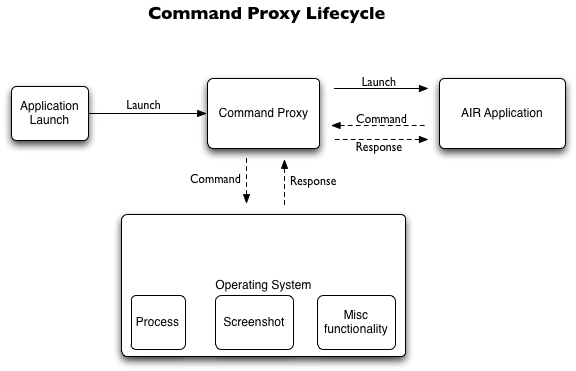
If another malicious application could somehow get that auth id, then it could then run commands through the command proxy (assuming it could also get the messaging format for the commands). The current proof of concept code has the AIR application communicate with the proxy over a socket connect (on a random port). It would theoretically be possible for another application running on the user’s system to sniff the data on the connection and grab the auth token. One solution for this would then be to encrypt the communication from the AIR application to the proxy. This could be done via encrypted sockets (not currently supported in AIR), HTTPS communication, or other custom encryption. Of course, since the malicious application is also running locally, it could try and sniff the memory for the AIR applications and / or proxy and thus steal the auth token.
However, lets think about this for a second. If the malicious code is running on the user’s machine, and can do things such as sniff local traffic and memory, why would it try and exploit the command proxy? Why wouldn’t it just do whatever bad thing it wanted to do itself? i.e. at least in this case, it seems like the primary security issue is not that the AIR application / command proxy communication might be able to be sniffed, but rather that somehow some other malicious code was already on the user’s system. I am interested in other’s thoughts on this.
The way the example code is setup now, it contains a generic exec command and screenshot command. If your application only ever needs to launch one application, then the path to that application could be hardcoded in the proxy (meaning for example, the worst that could happen is a malicious app could load the application). That is not to suggest that there is not a potential issue, but rather that any command proxy code can be coded to do only what you need it to.
Again though, the code I posted was just a proof of concept to generate though and discussion (which is why I didnt release any binaries). I would be curious in hearing any other thoughts on potential development, deployment and / or security issues with the model, as well as potential alternatives.
Finally, the long term solution (and plan) is that the AIR runtime itself provide the low level functionality needed by developers. AIR 1.0 already provides access to the underlying operating system via number of APIs, and the scope of those APIs will only expand with each release.


[...] Update : I have posted some additional thoughts on the code here. [...]
Mike Chambers » Blog Archive » CommandProxy : .NET / AIR Integration Proof of Concept
22 Jan 08 at 2:05 pm
I agree with most of what you say. I think this is a nice solution but for most use cases it might not be practical. The nice thing about AIR is that it`s so easy and straight forward so in my opinion hacks like this kind of destroy this concept. The best thing would be if AIR get all the needed functionality itself so there would be no need to proxy to another runtime to do special tasks. Sure this will not be possible if we still want to have a small runtime. But what about a plugin mechanism were AIR downloads extra (officially from adobe) functionality in the background and extends the functionality if needed? I had this idea when i read this blogpost by Jim Weaver http://learnjavafx.typepad.com/weblog/2008/01/tjava-kernel-th.html about the new Java Kernel stuff.
However this made my day ;-)
“the long term solution (and plan) is that the AIR runtime itself provide the low level functionality needed by developers. AIR 1.0 already provides access to the underlying operating system via number of APIs, and the scope of those APIs will only expand with each release”
looking forward to what AIR will offer in the future!
Benjamin Dobler
22 Jan 08 at 2:28 pm
one vote for extra-alike plugin structure, they could even be cached like RSL…
jeremy
22 Jan 08 at 5:17 pm
quote from the link Benjamin:
“the bundles that are needed by the program are downloaded in the background as the program is starting up.”
this looks really promising.
jeremy
22 Jan 08 at 5:18 pm
Allow me to clarify, both parties were responsible for the tangent, yourself included.
I’m also glad you’ve dealt with the fallout in a manner that puts it in perspective. It is as you say, a valid conversation to have and keep in mind my only intent is to protect the .NET brand as there are a lot of myths and misconceptions out there around both our products.
I cannot tell you how many times I have to seperate Flex from AIR when talking to customers as they assume the two are one in the same.
It took 4 Adobe Staffers to get to the bottom of this, I think in the end you and I should have a sit down at a next event we both meet at and work out a better way to communicate with one another as this gets us no where fast? wouldn’t you agree?
-
Scott Barnes
RIA Evangelist
Microsoft.
Scott Barnes
22 Jan 08 at 6:14 pm
I am glad to hear that the long term plan is for the AIR runtime itself to provide the low level functionality needed by developers. I believe Adobe is concerned about the fact that AIR could be used to create some malicious applications. I respect this opinion. But what if I would like to write some applications with a really cool UI that require total access to the system like many of the system tools you, database manipulation tools, you name it, see 99% of the applications you use today…Check out the Applications folder of your Mac. I would love to see Adobe find a way to provide a mode for an AIR application to support this. This mean delegating some of the responsibilities that AIR is taking on to the developer. I.e. no installation support, no code signing support, limited cross platform support. Now why in the world would I like to do that. They are several reasons, for instance if AIR doesn’t allow me to do that I will need to take a native development environment to build such an application, but then I cannot leverage my Air/Flex skills to build cool UIs for tools that go beyond the scope of what AIR provides. Every platform supports a native development environment and yes people could build malicious applications with them, but that’s also the way most cool apps you use today are written. Why limit the reach of what AIR can do? Maybe one approach would be to provide a Flex/AIR DesktopRunTime which developers would be allowed to distribute and which wouldn’t be AIR. That way you provide AIR as the cross platform solution, which is also awesome and still support other very meaningful use cases. In any case AIR rocks as it is and we love to see your team expand it.
Daniel Wanja
22 Jan 08 at 7:53 pm
Honestly, we already do something like this with the Flash plugin itself. The big advantage to AIR is that you don’t need another runtime wrapper. This concept breaks that model. Also, as you mentioned is wholly unsecure. I’d still like to see Adobe extend AIR to allow some C++ hooks(anything really). It would make management much simpler and give developers options that Adobe doesn’t want to stub out themselves. Think JNI. Better yet, skip JNI and head to a JNIWrapper model. That is the best of both worlds.
James Setaro
23 Jan 08 at 9:47 am
If you create a new class of trusted AIR applications that are allowed to access the OS, who polices that? I’m pretty sure Adobe doesn’t want that responsibility, or the implied liability when someone figures out how to circumvent it. One alternative is to somehow mark or sign AIR applications that have OS access enabled and make the user responsible for deciding whether the application is allowed to run. This is similar to the “safe for scripting” tag on ActiveX controls in the browser and the “Allow/Cancel?” prompt in Vista that everyone loves. Does that really improve the end user experience? Is the extra power worth the aggravation or the risk?
Once you have decided to trust an application and run it on your system it can do anything you can do. There’s no getting around that. Once you install the AIR runtime you are trusting it to do no harm. If the rules change and AIR applications have unfettered access to the OS then you can no longer blindly trust the AIR runtime or AIR applications. Can any current antivirus software scan AIR applications? Do you have any protection once the AIR runtime is installed?
The power of the application deployment model in AIR means that Adobe has to be careful what they allow AIR applications to do or risk creating the best virus distribution channel the web has ever seen.
Tim Goss
23 Jan 08 at 10:15 am
>Once you install the AIR runtime you are trusting it to do no harm. If the rules change and AIR applications have unfettered access to the OS then you can no longer blindly trust the AIR runtime or AIR applications.
Just to be clear here, but you should not blindly trust all AIR applications (just as you should not blindly trust all desktop applications).
AIR applications have access to some functionality of the underlying operating system (such as file system access). It cant do as much (good or bad) as say a native .net windows apps, but it could definitely do bad things.
mike chambers
mesh@adobe.com
mikechambers
23 Jan 08 at 10:36 am
[...] you can launch other applications and this can only be done by the user at the moment. There is a discussion about it going on, let’s see how it will [...]
nulldesign - personal portfolio and flash experiment corner of lars gerckens » Launch applications from AIR
23 Jan 08 at 12:11 pm
>Just to be clear here, but you should not blindly trust all AIR applications
> (just as you should not blindly trust all desktop applications).
Agreed. The damage an AIR app can do is currently limited by what the runtime allows it to do. The limitation provides some degree of trust in the AIR runtime. The level of trust may not be easily quantifiable, but it’s there and to me, as a user, it’s comforting. There’s a world of difference between running an AIR application and worrying about it overwriting the data for another AIR app vs. having to worry about it possibly installing a rootkit. At the end of the day, the only “safe” solution is to only run digitally signed AIR apps from publishers you trust.
Tim Goss
23 Jan 08 at 1:19 pm
It seems to me that there are two different things that people want to use AIR for with slightly different requirements.
On the one side there’s the RIA camp who want to create applications which are distributed via the web with a casual install process. This camp wants AIR to be as secure as possible and would rather lose functionality than compromise this.
The other camp wants to create more traditional “desktop type” applications and wants the maximum functionality and extensability from AIR with the idea that the install process is less casual and the user takes responsibility for the security.
To my mind the way to handle this is to let AIR create self contained executable files which can access “Xtras” and also “air” files which can’t. Users and IT professionals already know that an executable file can be insecure so this is building on what’s already out there. That way you can keep the “air” file associated with secure applications. Yes the self contained executable would be larger than an air file but this is less of an issue with less casual installations anyway.
The ability to create a self contained executable would also be useful for certain applications in itself.
Interesting that these things are still up for discussion - lets keep talking these issues through
Cheers
Joe
Joe Cutting
24 Jan 08 at 3:48 am
A while ago I was in a jam and needed lower system functions from within my AIR app. The problem of getting AIR installation process swap shortcut to point to “middle-man” code was a pain. Finally, I had it send the installation path to my server while it “activated” and downloaded a custom shortcut. This works fine for Windows as it was a niche application and my client didn’t have *nix or Mac machines.
http://raa.ruby-lang.org/project/win32-shortcut/
An idea just popped up: why not rename the AIR app and put the proxy program in place of it? If the AIR application cannot move itself, throw the proxy program on the desktop with a “Run me First” name. Now, make it part of the installation process but without all the restarting.
Cheers,
Tim
tim watts
25 Jan 08 at 5:53 pm
I have to say that I am rather disappointed with the lack of a roadmap for the closer integration of the Air runtime with the native operating system. I have been considering porting what is quite a sophisticated system developed in Flex and being distributed as Flash Projectors to Air. I have been disappointed that running native applications is possible from that old platform and not from the new platform. I will have to consider this method of distribution using old technology as permanent until you publish a roadmap with some clarity on the subject.
While I totally sympathise with the security and cross-platofrm concerns that drive the lack of a fuller native interface I think that this will be a critical deal-breaker for a number of developers.
I am pretty mystified that while some methods of the flash.filesystem package give some pretty powerful access to the native filesystem, a signed application can never be given the permission to execute external code. I don’t see how this workaround contributes to the security of Air Apps.
Stephen Bradley
10 Mar 08 at 10:09 am
Personally, I am a little mystified as to why there is such contention regarding this issue. (either issue; the open port or the AIR application executing code) I’m even further mystified as to why this ability was not included in AIR 1.0. Until I went to figure out how to launch an external application or open a file system window I had just assumed that it was directly supported. Why anyone would have security concerns over an installed application is beyond me. You are installing it… if you don’t trust the source… Why in the world would you install it? NO amount of certificates, sand boxes or signing is going to get around the fundamental fact that the user is ultimately responsible for what they allow to be installed on their computer. Fundamentally this is no different than any C, VB or (insert language here) application you might install. Personally the “security issues” line from Adobe sounds like a cop out. My theory is two fold;
A: this functionality would have added significant time to the release date
B: Adobe want to avoid all possibility of bad publicity because of Trojans being delivered via AIR applications.
As a policy I don’t necessarily disagree with either of these… however as already stated this will severely limit the usefulness of AIR for certain applications.
Considering what is already possible to do with AIR the security issue is a red-herring and an untenable argument. It would probably be better for Adobe to not stand behind an position that is illogical and makes absolutely no sense and just admit to the what the business decision was to not include this functionality. I would hope that in the next release this functionality is enabled at least for signed applications.
Justin Ohms
10 Mar 08 at 2:28 pm
[...] gemacht (Projekt CommandProxy) wie man diese Beschränkung umgehen könnte, scheint aber selbst nicht so recht davon überzeigt. Alternativ könnte sich auch ein Blick auf das Artemis Projekt lohnen (eine AIR/Java Bridge), [...]
Web-Programmer | Was AIR nicht kann…
22 Mar 08 at 1:07 am
I was really surprised (and still disappointed) that it is not possible to access the underlying OS. I’m using a “FLEX - Javascript - Signed Javapplet” solution in a WEB app. for finding and launching local applications (e.g. editors for doc and pdf files). I thought now I could get rid of this mess, but the CommandProxy and AIR is not what I was waiting for ;-(,
although nice try Mike!
Come on Adobe - if SUN could do it years ago with signed java applets…
Stefan
31 Mar 08 at 12:26 pm
[...] http://aperture.fluorinefx.com/ http://www.mikechambers.com/blog/2008/01/22/commandproxy-its-cool-but-is-it-a-good-idea/ [...]
Flex Monkey Patches » Blog Archive » Launching external applications from AIR
23 Jul 08 at 2:27 pm
This is excellent work… but if there is any support for using the Command Proxy with Flash cs3+AIR, that would be great..
I want to use the print screen function in my air app..
Thanks in advance..
-sara
http://www.designscripting.com/
Saravanan
5 Nov 08 at 4:59 am